
Canvas Display Variants
Canvas Display Variants
Section titled “Canvas Display Variants”Every model editor (DDD, ABSL, USM, C4, DSM) has a Display options button — the tune
icon in the canvas toolbar. It controls how the canvas renders along three independent
axes, each with named variants you can pick from illustrated cards:
- Detail level — how much information each node shows (all editors)
- Owned children — how a node’s events, value objects, and triggers are rendered (DDD, ABSL)
- Layout bands — whether the grid layout groups elements into swimlanes (DDD)
Your choices are saved per user and apply to all canvases. The same variants (with the same names and previews) are available under Settings → Display, and the canvas popover shows only the axes the current editor supports.
The variants are grounded in published graph-drawing practice — progressive disclosure and overview-first navigation (Dwyer et al., InfoVis 2008), semantic zooming with topology preservation (Frisch et al., SoftVis 2008), compound/layered graph layout (ELK Layered), and edge bundling for parallel flows (Selassie, Heller & Heer, TVCG 2011).
Detail level
Section titled “Detail level”Controls how much of a node’s internals is rendered — the same model at three levels of density (LoD 0–2), plus a zoom-driven mode that switches between them automatically.
Structure only
Section titled “Structure only”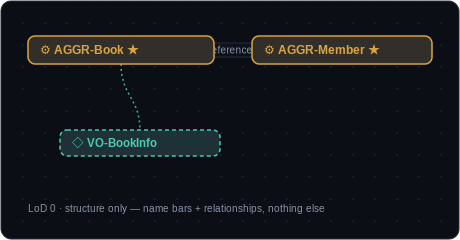
Nodes collapse to their name bar — the whole model skeleton at a glance. Best for large models where you care about relationships, not attributes.
- What happens: property rows, payloads, and pills disappear; only names and edges remain.
- Trade-off: nothing about a node’s internals is visible without zooming or switching levels.
- This is LoD 0 — the zoomed-out end of progressive disclosure.
Summary (default)
Section titled “Summary (default)”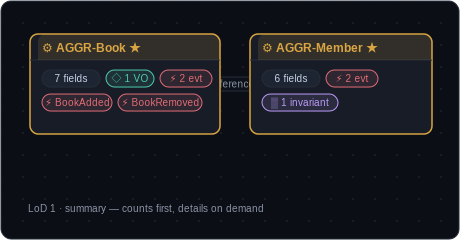
Name plus count pills (fields · events · value objects). The classic canvas density, and the default.
- What happens: each node shows what it contains as counts — “7 fields”, “⚡ 2 events” — with the lists one click or zoom-step away.
- Trade-off: attribute types are not scannable at a glance.
- Principle: counts before lists — “⚡ 3 events” first, the list on demand.
Full detail
Section titled “Full detail”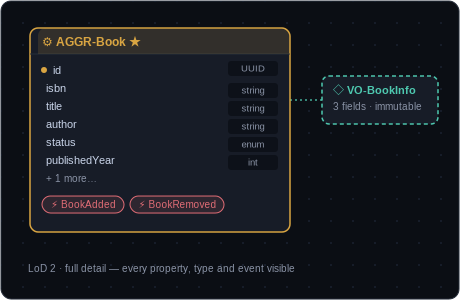
Every property, type, payload, and invariant rendered on the node.
- What happens: all attribute rows with their type chips, event pills, and invariants.
- Trade-off: nodes get tall and the canvas gets dense — pair it with Docked chips or Edge labels (below) to keep events off the canvas.
Adaptive zoom
Section titled “Adaptive zoom”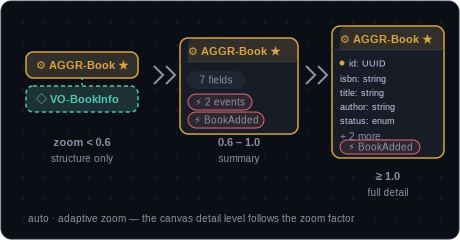
Detail follows the zoom level: far out → structure only, mid → summary, close → full detail.
- What happens: zoom below 0.6 renders structure only; between 0.6 and 1.0 renders summary; at 1.0 and above renders full detail. Node positions stay stable while the detail changes (topology preservation), so zooming never breaks your mental map.
- Trade-off: the level you see depends on where you are; the other two detail variants pin it explicitly.
Owned children
Section titled “Owned children”Applies to elements owned by exactly one parent — domain events and value objects in the DDD editor, triggers in the ABSL editor. Three treatments, from most explicit to most compact.
Free nodes (default)
Section titled “Free nodes (default)”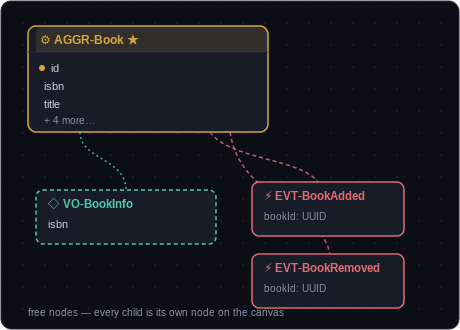
Children render as their own nodes beside their owner — most explicit, uses the most canvas.
- What happens: every event and value object is a full canvas node, wired to its owner with a dashed edge (red for event flow, teal for value-object usage).
- Trade-off: on busy models, free children collide with aggregates and each other, and long names truncate. Best on small models or when payloads must stay visible.
Docked chips
Section titled “Docked chips”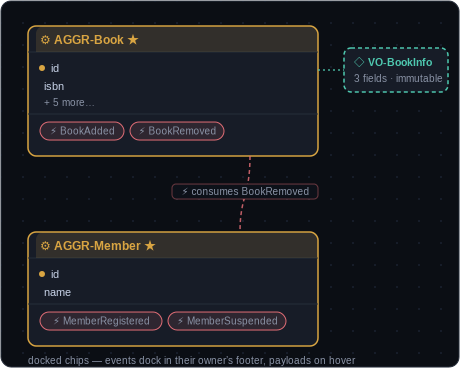
Children dock as chips inside their owner’s footer — the biggest declutter win.
- What happens: an event emitted by exactly one aggregate docks in the owner’s footer
strip as a small chip (hover for the payload). Cross-aggregate reactions — like
BookRemoved → Member— become a single labeled edge. - Trade-off: payloads hide behind hover. Since an event belongs to exactly one aggregate, it doesn’t need to be a free node — this removes most floating boxes at a stroke.
Edge labels
Section titled “Edge labels”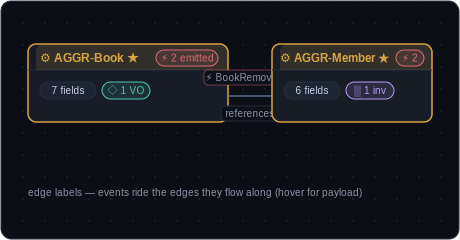
Children stop being nodes; their flows render as labeled edges between owners.
- What happens: an event is a fact about a transition, so it’s drawn as a label on the edge it travels along. Self-contained events collapse into a count badge on the owner (“⚡ 2 emitted”). The most aggressive node reduction.
- Trade-off: payloads are fully hidden (hover only). Best when the diagram’s job is communicating structure, not event payloads — for example on dense context maps.
Layout bands
Section titled “Layout bands”DDD only, grid layout only (no effect under Dagre/Force).
Owner stacks (default)
Section titled “Owner stacks (default)”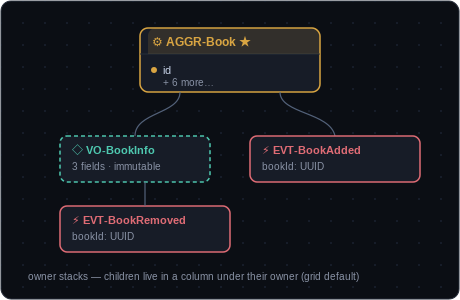
Children stack vertically beneath their owner — the classic grid look.
- What happens: each owner’s children form a column under it, wired with short stubs. Ownership is readable top-down within each stack.
Swimlanes
Section titled “Swimlanes”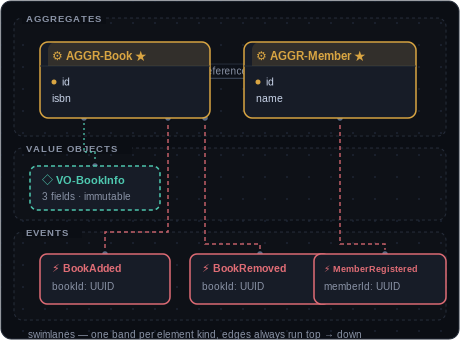
Horizontal bands per element kind (aggregates on top, VOs and events below); edges always run top→down.
- What happens: a reserved horizontal band per stereotype — no band ever contains a foreign node, edges are routed orthogonally and anchored at ports, and the reading order is learned once. Excellent for static exports (docs, PDF, README images) where interaction isn’t available.
- Trade-off: uses more vertical space, and events are nodes again — combine with Docked chips if that bothers you.
Choosing a setup
Section titled “Choosing a setup”The defaults — Summary + Free nodes + Owner stacks — reproduce the classic canvas. For dense models, the recommended progression:
- Start with Docked chips — the single biggest declutter win.
- Add Adaptive zoom so density takes care of itself as you navigate.
- Switch layout to Swimlanes when you need a print-friendly, deterministic arrangement.
- Fall back to Edge labels for very dense bounded contexts where events are not the main topic.
The principles behind all variants:
- One home per element. Owned children live inside their owner; only aggregates (and cross-aggregate edges) are free nodes. This single rule removes most collisions.
- Counts before lists. “⚡ 3 events” first, the list on hover/click — for fields, events, invariants, and handlers alike.
- Never truncate mid-word. Truncation (
BookRemo…) is a symptom of missing progressive disclosure; replace it with count pills. - Consistent edge semantics. One direction rule (ownership top→down, references left→right), one style per relation kind (solid = reference, dashed = event flow, dotted = value-object usage).
Where to change it
Section titled “Where to change it”- Canvas toolbar — the
tune(“Display options”) button in any model editor; the popover shows the axes that editor supports, as tabbed pages of illustrated cards. - Settings → Display — the same variants for all canvases, persisted per user.